Smart Cover1.5
Publisher Description
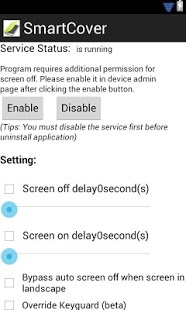
If your device with the proximity sensor, this application is able to control your device's screen on/off while the flip cover has closed/opened.
Use Cases:
1. Flip Cover - Auto screen on/off when the flip cover has closed/opened.
2. Motion - Turn over to switch off screen, and vice versa.
3. Pocket - Putting the phone into pocket will turn off screen, and vice versa.
Main Feature:
1. Config the screen off delay time to avoid fault screen off detection.
2. Bypass auto screen off when screen in landscape mode.
3. Allow disable screen on / off independently.
4. Provide a notification bar icon for monitoring the status and a short cut to program config.
5. Provide a skip the lock screen page function when auto screen on (beta).
6. Auto start the application when reboot device.
7. Support language: English, Traditional Chinese, Simplified Chinese and Korean.
8. Work fine on the most of android 4.0.3 device with proximity sensor.
Tips:
- To prevent program auto killed by system, please show icon on notification bar
- Refer to the limitation of system, the screen off function requires device admin permission
- You must disable the service first before uninstall application
About Smart Cover
The company that develops Smart Cover is Titbitsoft. The latest version released by its developer is 1.5. This app was rated by 1 users of our site and has an average rating of 3.0.
To install Smart Cover on your Android device, just click the green Continue To App button above to start the installation process. The app is listed on our website since 2013-01-15 and was downloaded 144 times. We have already checked if the download link is safe, however for your own protection we recommend that you scan the downloaded app with your antivirus. Your antivirus may detect the Smart Cover as malware as malware if the download link to com.titbitsoft.smartcover is broken.
How to install Smart Cover on your Android device:
- Click on the Continue To App button on our website. This will redirect you to Google Play.
- Once the Smart Cover is shown in the Google Play listing of your Android device, you can start its download and installation. Tap on the Install button located below the search bar and to the right of the app icon.
- A pop-up window with the permissions required by Smart Cover will be shown. Click on Accept to continue the process.
- Smart Cover will be downloaded onto your device, displaying a progress. Once the download completes, the installation will start and you'll get a notification after the installation is finished.
Program Details
System requirements
Download information
Pricing
Version History
version 1.5
posted on 2013-01-15
v1.5,- Fixed the smart cover cannot disabled on some device
version 1.5
posted on 2013-01-15
Several fixes and updates
